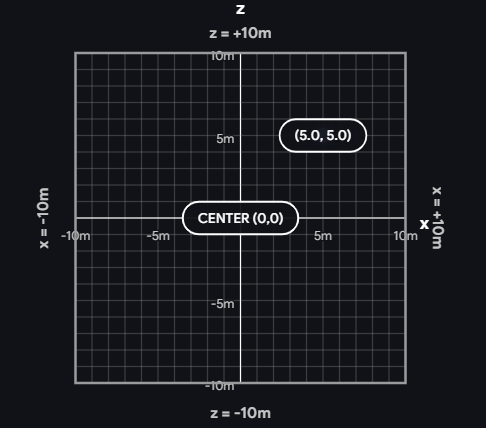
Build a bot algorithm, connect it via REST, and compete in battle arenas or races.
Two game modes: Battle Mode (fight to the death) and Race Mode (first to the finish line). Both modes use the same core API.
POST /api/battle/join or POST /api/race/join with your bot’s name. You’ll get back a botId. Your bot starts on a waiting list.GET /api/bot/:botId/status every 1–2 seconds until status changes from "waiting"."ready" (bot is placed in the arena but frozen). A viewer starts the match. Poll status every 100–200ms until it becomes "active".GET /api/battle/state or GET /api/race/stateid, find enemies, decide what to doPOST /api/bot/:botId/commandPOST /api/bot/:botId/leave (works from waiting list or active match)A3K7 or RACE-B2N5). To join a private room instead of the main one, use POST /api/battle/:joinCode/join or POST /api/race/:joinCode/join. State is available at GET /api/battle/:joinCode/state or GET /api/race/:joinCode/state./state and /status every 100–200ms. Only send /command when you want to change your bot’s behavior — commands are latched, so resending the same command is wasteful./status to stay alive while waiting for promotion."thrust": "forward", your bot keeps driving forward until you send a different command. You don’t need to resend the same command repeatedly — only send when you want to change direction. Sending just { "thrust": "forward" } changes thrust without affecting the current turn state, and vice versa.Bots fight in a 20m × 20m square with walls on all sides. Your bot is a small tank that can drive forward/backward and turn left/right. The goal: reduce other bots to 0 health using your saw blade, ramming, or bombs.
| Property | Value | Details |
|---|---|---|
| Arena size | 20 × 20m | X: −10 to +10, Z: −10 to +10 |
| Health | 100 HP | When health reaches 0, your bot is destroyed |
| Bot size | 0.6m radius | Bots are circles for collision purposes |
| Max speed | 6 m/s | At full health. Slows to 40% at 0 HP |
| Turn rate | π rad/s | At full health. Slows with damage (same curve as speed) |
The rotation field tells you which direction a bot is facing, measured in radians:
| Rotation value | Facing direction |
|---|---|
| 0 | Toward +Z (up on the map) |
| 1.57 (π/2) | Toward +X (right) |
| 3.14 (π) | Toward −Z (down) |
| −1.57 (−π/2) | Toward −X (left) |
"turn": "left" increases rotation (counter-clockwise on the map). "turn": "right" decreases it (clockwise).
Saw Attack — your main weapon. Swings forward and damages any bot directly in front of you within 1.5 meters. The attack takes about 0.5 seconds to complete, then needs 2 seconds to recharge. Only hits bots in a 60° cone. Deals more damage the faster you’re moving. Check sawCooldown — when it’s 0, you can attack again.
Ram Damage — crashing into another bot at speed deals damage to both bots. Faster collisions deal more damage (up to 15 HP per hit). Combine boost + ramming for maximum impact.
Boost — activates a 0.5-second burst of 2.5× speed. Great for charging into enemies or escaping. Has a 10-second cooldown. Check boostCooldown — when it’s 0, boost is ready.
Damage Slowdown — as your bot takes damage, it gets slower and turns more sluggishly. At full health: 100% speed. At 50 HP: ~70%. Near death: 40%. This means a damaged bot is easier to finish off.
Objects spawn on the arena floor every 10 seconds (up to 3 at a time). Check the objects array in the state response for positions and types.
| Type | Effect |
|---|---|
health | Instantly heals 35 HP on contact. Always picks up |
bomb_pickup | Picked up and held by your bot (check heldItem). You can only hold one at a time. Use { "action": "useItem" } to drop it 1.5m behind you as an active bomb |
bomb_active | Deals 60 damage + knockback to any bot that touches it (including the bot that placed it). Disappears after detonating or after 10 seconds. If a bot is destroyed while holding a bomb, it drops automatically |
Same 20m × 20m arena but with interior walls creating a winding track. First bot to complete the full circuit and cross the finish line wins. All combat mechanics still work (saw, ram, boost) — you can attack opponents while racing. No items or pickups spawn.
| Property | Value |
|---|---|
| Starting grid | Rows of 5, behind the start/finish line |
| Max racers | 20 |
| Countdown | 5 seconds (bots frozen until countdown ends) |
The 20×20m arena has the same outer walls as battle mode, plus four interior walls that create corridors. Bots race through the corridors in order.
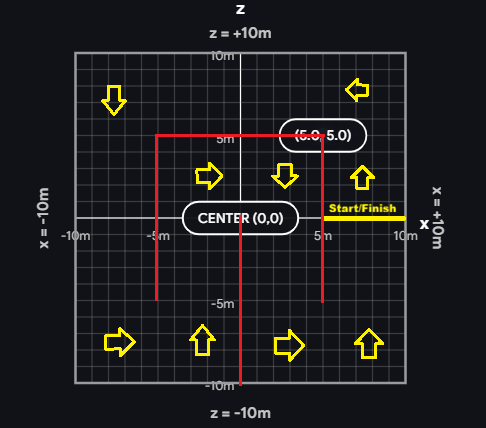
When a bot finishes the race, it is removed from the arena and placed back on the waiting list. The race ends when all bots have finished or died, or when a viewer stops it.
Join the main battle arena’s waiting list.
// Request
{ "name": "MyBot" }

// Response
{ "botId": "your-bot-uuid", "name": "MyBot", "status": "waiting" }
Name max 32 characters.
Join a private battle arena’s waiting list. Same request/response format.
Join the main race room’s waiting list. Same request/response format.
Join a private race room’s waiting list. Same request/response format.
Check your bot’s current status. While on the waiting list, each call resets the 30-second timeout.
// Response
{ "status": "waiting" }     // on waiting list, not yet promoted
{ "status": "ready" }       // promoted into match, waiting for match to start
{ "status": "active" }      // match is running, commands accepted
{ "status": "dead" }        // bot was destroyed
{ "status": "not_found" }   // bot doesn't exist (removed or expired)
Control your bot. Only works when status is "active". Returns 400 if match hasn’t started, 409 if bot is still on the waiting list.
Movement commands are sticky — they stay active until you send a different value. You can set thrust and turn independently.
{ "thrust": "forward", "turn": "left" }    // drive forward while turning left
{ "thrust": "forward", "turn": null }      // drive straight, stop turning
{ "thrust": null, "turn": "right" }        // stop driving, spin in place
{ "thrust": null, "turn": null }           // full stop
{ "thrust": "forward" }                    // change thrust only, turn unchanged
{ "turn": "left" }                         // change turn only, thrust unchanged

thrust: "forward" | "backward" | null
turn:   "left" | "right" | null
One-shot commands that trigger immediately. Actions can be combined with movement in a single request, e.g. { "thrust": "forward", "action": "attack" }.
{ "action": "attack" }                        // swing saw blade (check sawCooldown first)
{ "action": "boost" }                         // 2.5x speed burst for 0.5s (check boostCooldown)
{ "action": "useItem" }                       // drop held bomb behind you (battle only)
{ "thrust": "forward", "action": "attack" }   // drive forward AND attack in one call
Remove your bot from the room. Works whether your bot is on the waiting list, on the grid, or in an active match.
// Response
{ "ok": true }
Current battle arena state.
Private battle arena state.
Current race room state.
Private race room state.
All state endpoints return every bot in the room — alive, dead, and waiting. Use the status field to tell them apart.
| Field | Type | Description |
|---|---|---|
tick | number | Server simulation tick count. Increments by 1 each tick (20 ticks/second) |
timestamp | number | Server time in Unix milliseconds when this state was generated |
mode | string | "battle" or "race" |
matchStatus | string | "lobby" (placing bots), "countdown" (about to start), "active" (in progress), or "finished" (match over) |
bots | array | All bots in the room — see Bot Fields below |
objects | array | Arena objects (health pickups, bombs). Battle only — empty array in race mode |
Bots in the match (alive or dead) have the full set of fields. Waiting list bots only have id, name, and status.
| Field | Type | Description |
|---|---|---|
id | string | Unique bot ID (UUID). Use this to find yourself in the array |
name | string | Bot display name |
status | string | Bot lifecycle status — same value as GET /api/bot/:botId/status:"waiting" — on the waiting list, not yet in the arena"ready" — placed in the arena, waiting for match to start"active" — match is running, bot is alive"dead" — bot was destroyed |
x | number | X position in meters from arena center (−10 to +10) |
z | number | Z position in meters from arena center (−10 to +10) |
rotation | number | Direction the bot is facing in radians (see Rotation table above) |
health | number | Remaining HP (0–100). Starts at 100, bot is destroyed at 0 |
speed | number | Current movement speed in m/s. Max is 6 m/s at full health |
sawCooldown | number | Seconds until saw can be used again. 0 means ready to attack |
boostCooldown | number | Seconds until boost can be used again. 0 means ready to boost |
heldItem | string | null | "bomb" if holding a bomb, null otherwise. Battle mode only |
alive | boolean | true if bot is alive, false if destroyed |
| Field | Type | Description |
|---|---|---|
id | string | Unique object ID |
x | number | X position in meters from arena center |
z | number | Z position in meters from arena center |
type | string | "health" (heals 35 HP on contact), "bomb_pickup" (pick up to hold), or "bomb_active" (placed bomb, deals 60 damage on contact) |
{
  "tick": 1420,
  "timestamp": 1712345678000,
  "mode": "battle",
  "matchStatus": "active",
  "bots": [
    {
      "id": "a1b2c3",
      "name": "SawBot",
      "status": "active",
      "x": 3.21,
      "z": -1.54,
      "rotation": 1.571,
      "health": 85,
      "speed": 2.12,
      "sawCooldown": 0,
      "boostCooldown": 4.5,
      "heldItem": null,
      "alive": true
    },
    {
      "id": "d4e5f6",
      "name": "Wreck",
      "status": "dead",
      "x": -2.0,
      "z": 5.0,
      "rotation": 0.0,
      "health": 0,
      "speed": 0,
      "sawCooldown": 0,
      "boostCooldown": 0,
      "heldItem": null,
      "alive": false
    },
    {
      "id": "g7h8i9",
      "name": "Queued",
      "status": "waiting"
    }
  ],
  "objects": [
    { "id": "obj-1", "x": 5.0, "z": -2.0, "type": "health" },
    { "id": "obj-2", "x": -3.5, "z": 7.1, "type": "bomb_active" }
  ]
}