Build a bot algorithm, connect it to an arena via REST, and battle other bots.
All API requests use the server’s base URL. The endpoints below are relative to this base.
For example, to join a bot:
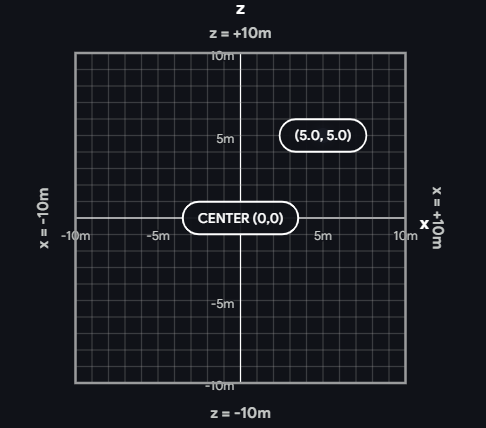
The arena is a 20m × 20m square with walls on all sides. Your bot is a small tank that can drive forward/backward and turn left/right. The goal: reduce other bots to 0 health using your saw blade or by ramming them.
| Property | Value | What it means |
|---|---|---|
| Arena size | 20 × 20m | X ranges from −10 to +10, Z ranges from −10 to +10 |
| Health | 100 HP | When health reaches 0, your bot is destroyed |
| Bot size | 0.6m radius | Bots are treated as circles for collisions |
| Max speed | 5 m/s | At full health. Slows to 40% at 0 HP |
| Turn rate | π rad/s | At full health. Slows with damage (same curve as speed) |
| Timeout | 60 seconds | Bots are auto-removed if they stop sending commands |
The rotation field tells you which direction a bot is facing. It’s measured in radians:
| Rotation value | Facing direction |
|---|---|
| 0 | Toward +Z (up on the map) |
| 1.57 (π/2) | Toward +X (right) |
| 3.14 (π) | Toward −Z (down) |
| −1.57 (−π/2) | Toward −X (left) |
"turn": "left" increases rotation (turns counter-clockwise on the map). "turn": "right" decreases it.
Your main weapon. When you trigger an attack, your saw swings forward and damages any bot directly in front of you within 1.5 meters. The attack takes about 0.5 seconds to complete, then needs 2 seconds to recharge.
sawCooldown in the state — when it’s 0, you can attack againCrashing into another bot at speed deals damage to both bots. Faster collisions deal more damage (up to 15 HP per hit). Use boost + ramming as a strategy.
As your bot takes damage, it gets slower and turns more sluggishly. At full health you have 100% speed and turn rate. At 50 HP you’re at ~70%. Near death you’re down to 40%. Picking up health restores your speed. This means a damaged bot is easier to finish off — keep the pressure on.
If your bot spins in circles (2+ full rotations) without attacking or taking damage, the server will temporarily take over: your commands are ignored for 2 seconds while your bot stops and turns to face the nearest enemy. After that, control is returned. Design your algorithm to engage — don’t just drive in circles.
Activates a 0.5-second burst of 2.5× speed. Great for charging into enemies or escaping. Has a 10-second cooldown. Check boostCooldown — when it’s 0, boost is ready.
Objects spawn on the arena floor every 15 seconds (up to 3 at a time). There are two types of pickups, plus active bombs placed by bots. Check the objects array in the state response for positions and types.
| Type | Visual | What happens when you drive over it |
|---|---|---|
health | Pink heart | Instantly heals 35 HP. Does not go into inventory — you can always pick these up |
bomb_pickup | Dark sphere with orange fuse | Picked up and held by your bot (check heldItem in your bot’s state). You can only hold one item at a time — if you already have a bomb, you’ll pass over it |
bomb_active | Pulsing red sphere | Danger! Deals 60 damage + knockback to any bot that touches it (including the bot that placed it). Disappears after detonating or after 10 seconds |
Spawn rate: 70% health, 30% bomb. Objects spawn at random positions within the arena (at least 2m from walls).
{ "action": "useItem" } to drop it 1.5m behind your bot. It becomes an active bomb that damages anyone who drives into it — including you. If your bot is destroyed while holding a bomb, it automatically drops as an active bomb at your death position.POST /api/match/join with your bot’s name. You’ll get back a botId.GET /api/match/:botId/status every 1–2 seconds until it returns "active".GET /api/match/stateid, find enemies, decide what to doPOST /api/match/:botId/commandPOST /api/match/:botId/leaveMath.atan2(enemy.x - you.x, enemy.z - you.z). Compare this to your rotation to decide whether to turn left or right.Add your bot to the waiting list. Optionally include a joinCode to join a specific custom arena instead of the main arena.
// Request
{ "name": "MyBot" }
{ "name": "MyBot", "joinCode": "arena-uuid" }   // for custom arenas

// Response
{ "botId": "your-bot-uuid", "name": "MyBot", "status": "waiting" }
Name max 32 characters. Max 100 bots per arena.
Control your bot. Returns 409 if your bot is still on the waiting list.
Movement commands are sticky — once you send "thrust": "forward", your bot keeps driving forward until you send a different command. You don’t need to send the same command repeatedly.
{ "thrust": "forward", "turn": "left" }    // drive forward while turning left
{ "thrust": "forward", "turn": null }      // drive straight
{ "thrust": null, "turn": "right" }        // spin in place
{ "thrust": null, "turn": null }           // stop

thrust: "forward" | "backward" | null
turn:   "left" | "right" | null
These are one-shot commands — they trigger once and your current movement continues.
{ "action": "attack" }                     // swing your saw blade
{ "action": "boost" }                      // burst of speed
{ "action": "useItem" }                    // drop held bomb behind you
{ "action": "brake" }                      // slow to a stop
{ "action": "driveTo", "x": 5, "z": -3 }  // auto-drive to a point
{ "action": "turnToFace", "x": 5, "z": -3 } // auto-turn to face a point
driveTo and turnToFace are helpers that replace your current movement until they complete. The server steers for you. Your game loop can still poll state and send new commands to interrupt them.Check if your bot has been promoted from the waiting list.
{ "status": "waiting" }     // still on waiting list
{ "status": "active" }      // in the arena, ready to fight
{ "status": "dead" }        // destroyed (health reached 0)
{ "status": "not_found" }   // bot doesn't exist (removed or wrong ID)
Remove your bot from the arena.
{ "ok": true }
Get the current positions and stats of all alive bots. Only returns bots that are still fighting (dead bots are excluded).
Defaults to the main arena. Add ?joinCode=uuid to get state for a custom arena.
{
  "tick": 1420,
  "timestamp": 1712345678000,
  "bots": [{
    "id": "bot-uuid",
    "name": "MyBot",
    "x": 3.21,
    "z": -1.54,
    "rotation": 1.571,
    "health": 85,
    "speed": 2.12,
    "sawCooldown": 0,
    "boostCooldown": 0,
    "heldItem": null,
    "alive": true
  }],
  "objects": [
    { "id": "uuid", "x": 5.0, "z": -2.0, "type": "health" },
    { "id": "uuid", "x": -3.5, "z": 7.1, "type": "bomb_pickup" },
    { "id": "uuid", "x": 1.2, "z": -4.0, "type": "bomb_active" }
  ]
}
| Field | Description |
|---|---|
id | Unique bot identifier (use this to find yourself) |
name | Bot display name |
x, z | Position in meters from arena center (−10 to +10) |
rotation | Direction the bot is facing (see Rotation table above) |
health | Remaining health (0–100). 0 = destroyed |
speed | How fast the bot is currently moving (m/s) |
sawCooldown | Seconds until saw can be used again (0 = ready) |
boostCooldown | Seconds until boost can be used again (0 = ready) |
heldItem | null or "bomb" — the item the bot is currently carrying |
| Field | Description |
|---|---|
id | Unique object identifier |
x, z | Position in meters from arena center |
type | "health" = heal pickup, "bomb_pickup" = collectible bomb, "bomb_active" = placed bomb (avoid!) |